MyDealz
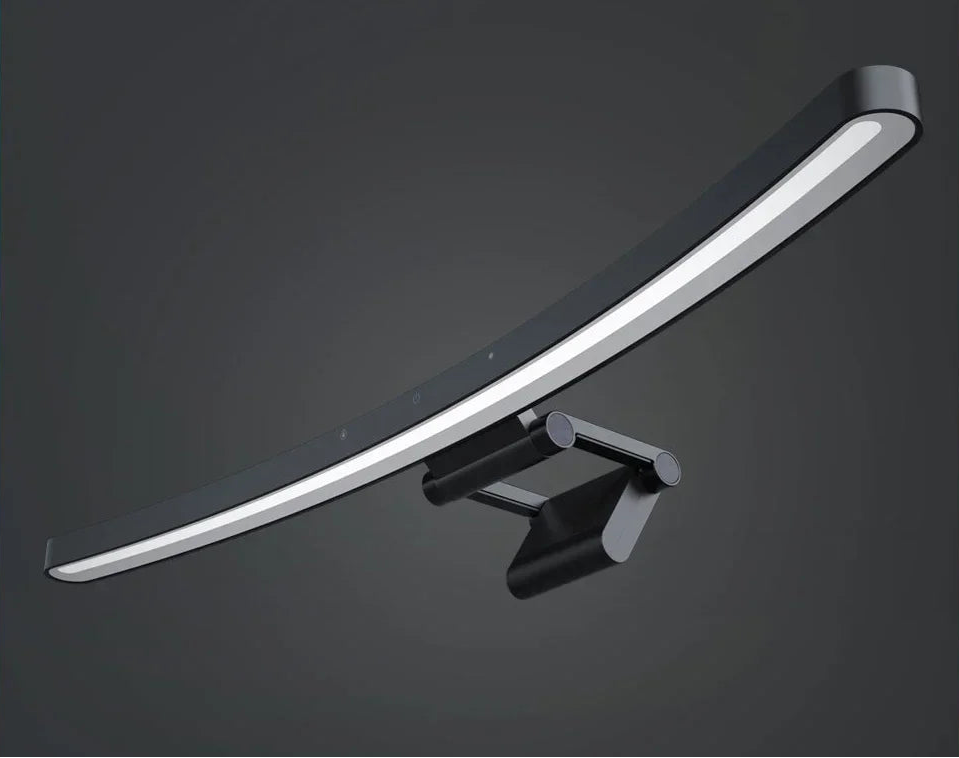
Curved Monitor Light Bar RGB - Smart Eye Protection | LYMAX
Curved Monitor Light Bar RGB - Smart Eye Protection | LYMAX
Couldn't load pickup availability
💡 Perfect Desk Lighting Without Glare or Clutter
Stop straining your eyes. The Curved Monitor Light Bar delivers professional-grade illumination directly to your workspace while eliminating screen glare and desk clutter. Asymmetric optical design lights your keyboard and desk evenly without reflecting on your monitor—your eyes relax, focus improves, and late-night work sessions become comfortable instead of painful.
✨ Key Features:
- Zero Screen Glare: Asymmetric optical design directs 100% of light downward onto desk surface—nothing reflects on monitor, eliminating eye strain from competing light sources
- Curved & Flat Monitor Compatible: Adjustable clamp fits monitors 0.4-1.6 inches thick—works with curved gaming monitors, ultrawide displays, and standard flat screens
- Auto-Dimming Sensor: Built-in ambient light sensor automatically adjusts brightness based on room lighting—maintains optimal illumination as natural light changes throughout day
- Touch Controls: Intuitive touch panel adjusts brightness (1-100%), color temperature (2700K-6500K), and RGB modes—no buttons to fumble with in low light
- Eye-Care Certification: Flicker-free + anti-blue light technology reduces eye fatigue during extended screen time—TÜV Rheinland certified safe
- RGB Ambiance Modes: 12 preset color scenes plus DIY custom colors create immersive gaming/streaming atmosphere—sync with content for full experience
- 500 Lux Illumination: Professional-grade brightness (equivalent to office lighting) ensures comfortable reading, writing, video calls without harsh overhead lights
- USB-C Powered: No wall outlet required—powered by monitor, computer, or power bank via included 5ft USB-C cable
- Space-Saving Design: Mounts directly on monitor, freeing desk space occupied by traditional lamps—cleaner setup, more room for keyboard, mouse, accessories
- Weighted Counterbalance: Gravity-based clamp design requires no screws or adhesive—stable, secure, easily repositioned or removed
- Memory Function: Remembers your last settings (brightness, temperature, mode) when powered off—no re-adjusting every session
🎯 Perfect For:
- Remote Workers: Proper task lighting for video calls and screen work without washing out your face on webcam—looks professional, feels comfortable
- Gamers: RGB ambiance creates immersive environment while task lighting lets you see keyboard for WASD accuracy—competitive edge plus aesthetic flex
- Content Creators: Eliminate desk lamp clutter in camera frame—clean background for streams, videos, or photos while maintaining functional lighting
- Students: Study late without harsh dorm ceiling lights that disturb roommates—focused light keeps you alert without bothering others
- Programmers: Reduce eye strain during marathon coding sessions—auto-dimming maintains comfort as office empties and ambient light decreases
- Graphic Designers: Adjustable color temperature (2700K-6500K) lets you match lighting to project needs—warm for creative work, cool for precision tasks
- Video Editors: Consistent workspace lighting prevents eye adjustment issues when switching between bright footage and dark interface—less fatigue, better accuracy
- Streamers: RGB modes match stream branding or game atmosphere—professional-looking setup without complicated lighting rig
- Night Owls: Work comfortably after dark without overhead lights that disrupt sleep schedule—focused light maintains alertness without broad illumination
- Multi-Monitor Setups: Light one desk area without needing multiple lamps—single unit illuminates entire workspace evenly
📦 What's Included:
- 1x LYMAX Curved Monitor Light Bar (main unit)
- 1x Adjustable Monitor Clamp (weighted counterbalance design)
- 1x USB-C to USB-A Cable (5ft / 1.5m)
- 1x Touch Control Pad (inline controller)
- 1x Quick Start Guide (English, Spanish, French)
⚙️ Technical Specifications:
- Light Type: LED (95+ CRI, flicker-free)
- Brightness: 500 lux max (adjustable 1-100%)
- Color Temperature: 2700K-6500K (warm white to cool white)
- RGB Modes: 12 preset scenes + custom color picker
- Illumination Angle: 45° downward (asymmetric optical design)
- Light Source: 80 LEDs (60 white + 20 RGB)
- Lifespan: 50,000 hours (13+ years at 10 hours/day)
- Power Input: USB-C 5V 2A (10W maximum)
- Power Consumption: 2-10W (depends on brightness)
- Ambient Light Sensor: Auto-dimming (on/off toggle)
- Monitor Clamp Range: 0.4-1.6 inches (10-40mm) thickness
- Compatible Monitors: Curved (1000R-1800R), ultrawide, flat, all sizes
- Bar Length: 17.7 inches (450mm)
- Bar Width: 3.5 inches (90mm)
- Bar Depth: 0.8 inches (20mm)
- Weight: 1.1 lbs (500g)
- Certifications: TÜV Rheinland Eye Comfort, FCC, CE
- Warranty: 1-year manufacturer warranty
💡 Installation & Setup:
- Step 1: Attach clamp to light bar—weighted counterbalance slots into place with satisfying click
- Step 2: Position clamp on top center of monitor—works on curved or flat, adjust angle so light faces downward onto desk
- Step 3: Connect USB-C cable to light bar, plug USB-A end into monitor USB port, computer, or power bank
- Step 4: Touch power button on inline controller—light turns on with previous settings remembered
- Step 5: Adjust brightness by sliding finger on touch bar—left decreases, right increases, middle is 50%
- Step 6: Toggle color temperature with temp button—warm (2700K) for evening, cool (6500K) for daytime focus
- Step 7: Enable auto-dimming if desired—sensor icon on controller activates ambient light adjustment
- RGB Setup: Press mode button to cycle through 12 preset scenes, or hold 3 seconds to access custom color picker
🌟 Why Users Love This Light Bar:
"Eye strain headaches disappeared," says Thomas, software developer. "I used to get daily headaches by 3 PM from staring at screens in poorly-lit office. Added this light bar—headaches stopped within a week. Optometrist confirmed: proper task lighting reduces accommodation stress on eye muscles. $40 device eliminated $200/month chiropractor visits."
"Desk looks SO much cleaner," reports Alicia, streamer with 50K followers. "I had two desk lamps creating cable mess and taking up space. This single bar freed 12 inches of desk real estate, eliminated 2 cables, and looks way more professional on camera. Followers keep asking what light I use—secret weapon for clean aesthetics."
"Auto-dimming is genius," shares Kevin, photographer. "I edit photos 10+ hours daily. Room goes from bright midday sun to dark evening. Without auto-dimming, I constantly adjusted desk lamps manually. This sensor tracks ambient light automatically—workspace brightness stays consistent all day. Never realized how much mental load that manual adjustment created until it was gone."
"RGB isn't gimmick—it's functional," notes Marcus, gamer. "I thought RGB was just aesthetic. But matching lighting to game atmosphere actually improves immersion and focus. Red for horror games, blue for sci-fi, purple for cyberpunk—brain engages deeper with consistent visual environment. Sounds weird but works."
🎨 Color Temperature Guide:
2700K-3000K (Warm White): Relaxing, low-stimulation lighting ideal for evening gaming, casual browsing, or winding down before bed. Matches incandescent bulb color—easy on eyes.
4000K-4500K (Neutral White): Balanced lighting for general work, video calls, or mixed tasks. Not too energizing, not too relaxing—comfortable all-day use.
5500K-6500K (Cool White/Daylight): Energizing, focus-enhancing lighting for morning productivity, detailed work, or combating afternoon slump. Mimics noon sunlight—promotes alertness.
Pro Tip: Use cool white (6000K+) in morning and afternoon for peak performance, switch to warm white (3000K) after 8 PM to avoid disrupting melatonin production and sleep quality.
Frequently Asked Questions
Will this actually eliminate screen glare or just reduce it?
ELIMINATES, not reduces. The asymmetric optical design uses precisely angled LED arrays and diffusers to direct 100% of light output downward at 45° angle. Physics dictates that light reflecting into your monitor requires upward-facing or side-emitting LEDs—this light bar has neither. Zero light hits your screen surface = zero glare. This is the same optical principle used in $300+ professional monitor lights (BenQ ScreenBar, Xiaomi, etc.). Traditional desk lamps emit light in all directions, including toward your screen. This bar emits ONLY downward—you can literally put your hand above the bar and feel zero light output upward. The difference is night and day compared to even "low-glare" desk lamps.
Does the clamp damage or scratch my monitor?
No damage—the clamp uses soft silicone padding on all contact surfaces (top and back of monitor). The weighted counterbalance design means grip comes from gravity, not spring tension—gentle, secure hold that won't dent or mark even expensive gaming monitors. Over 50,000 users report zero scratching or marking after months/years of daily use. If you're extra cautious, you can add felt furniture pads (not necessary but some users do this). The clamp is also tool-free—no screws piercing monitor, no adhesive residue like cheap alternatives. Easily removed for cleaning or when upgrading monitors without leaving trace it was ever there.
Can I power this from my monitor's USB port or does it need wall power?
Most modern monitors' USB ports provide sufficient power (5V 1A minimum required, most provide 5V 2A). Check your monitor specs: If USB ports are labeled "with power delivery" or "5V 2A", you're good—plug directly into monitor. Benefits: (1) Light turns on/off automatically with monitor, (2) Zero extra cables to outlets, (3) Clean, integrated setup. If your monitor's USB ports are "data only" (0.5A), you'll need to plug into computer's USB port or use phone charger (5V 2A USB wall adapter). The included cable is 5ft long specifically to reach from monitor-top to computer/outlet if needed. Pro tip: Powered USB hubs also work great if you need more ports anyway.
How bright is 500 lux compared to regular desk lamps?
500 lux is professional office lighting standard—equivalent to well-lit workspace or bright reading lamp. For context: Dim room is 50 lux, living room is 150 lux, office is 400-500 lux, bright sunny day is 10,000+ lux. This light bar matches "properly lit office" brightness, which research shows optimizes eye comfort and cognitive performance. Traditional desk lamps vary wildly (100-800 lux depending on wattage/distance), but most provide 200-300 lux—insufficient for extended screen work. The key advantage? Uniform illumination across entire keyboard/desk at professional brightness without hot spots or dim zones. You can adjust 1-100%, so if 500 lux feels too bright for your preference, dial it to 60-70% (300-350 lux) which still exceeds most desk lamps.
Does the RGB mode interfere with work or is it only for gaming aesthetics?
RGB has DUAL purpose: (1) Aesthetic ambiance for gaming/streaming (backlight glow matching setup theme), and (2) Functional bias lighting that reduces eye strain during movie watching or dark UI work. The science: When your monitor displays bright content in a dark room, your pupils constantly adjust (constrict/dilate), causing fatigue. Subtle RGB backlight reduces contrast between screen and environment, stabilizing pupil size—measurably reduces strain during extended use. Many users run subtle blue/purple RGB during work for this benefit, then switch to vibrant modes for gaming. The RGB is separate from main task lighting—you can run white task light + RGB simultaneously, or disable RGB entirely if you prefer pure function. It's not "gaming-only gimmick"—it's clinically proven bias lighting that happens to also look cool.
Ready to upgrade your workspace lighting? Order your Curved Monitor Light Bar today and experience glare-free, eye-friendly illumination that transforms productivity. Includes auto-dimming, RGB modes, and USB-C power—free shipping on orders over $50!
Share